Introduction to DbxSmith
DbxSmith is a professional-grade provisioning and management suite for Distrobox and Podman. It turns raw distrobox create commands into reproducible, strategy-driven environments with deterministic UI, stateful registries, and atomic teardowns.
Why DbxSmith?
Out of the box, Distrobox creates containers that share your host's home directory and network. That is convenient, but carries real risk. DbxSmith adds a strategy layer on top:
| Feature | Native Distrobox CLI | DbxSmith |
|---|---|---|
| Data Isolation | Shared Host Home — risky | Isolated home paths (~/boxes/<name>) |
| Network Security | Open host network | Strategy-based: airgapped or dedicated NAT bridge |
| Visual Safety | Default terminal theme | Image-hash derived background colors — always know where you are |
| State Persistence | Creation flags forgotten | Registry manifests (~/.config/dbx-smith/registry/) |
| Teardown | Container only — artifacts left behind | Atomic: removes container, home dir, network bridge, and alias fragments |
Quick Start
Get up and running with DbxSmith in six simple steps:
1. Install DbxSmith
Run the official installer. It installs the executables to ~/.local/bin/, sets up the config directories under ~/.config/dbx-smith/, and appends the runtime loader to your shell profile.
curl -fsSL https://raw.githubusercontent.com/arijit1begins/dbx-smith/main/install.sh | bash
2. Source the Shell Runtime
Because DbxSmith integrates directly with your host shell's autocomplete and alias systems, you must source your shell configuration to activate the dbx-smith commands:
source ~/.bashrc  # If using Bash
# OR
source ~/.zshrc   # If using Zsh
3. Launch TUI Mission Control (Recommended)
The fastest and most visually stunning way to manage your sandboxes is through the interactive terminal dashboard. Launch it with:
dbx-smith dash
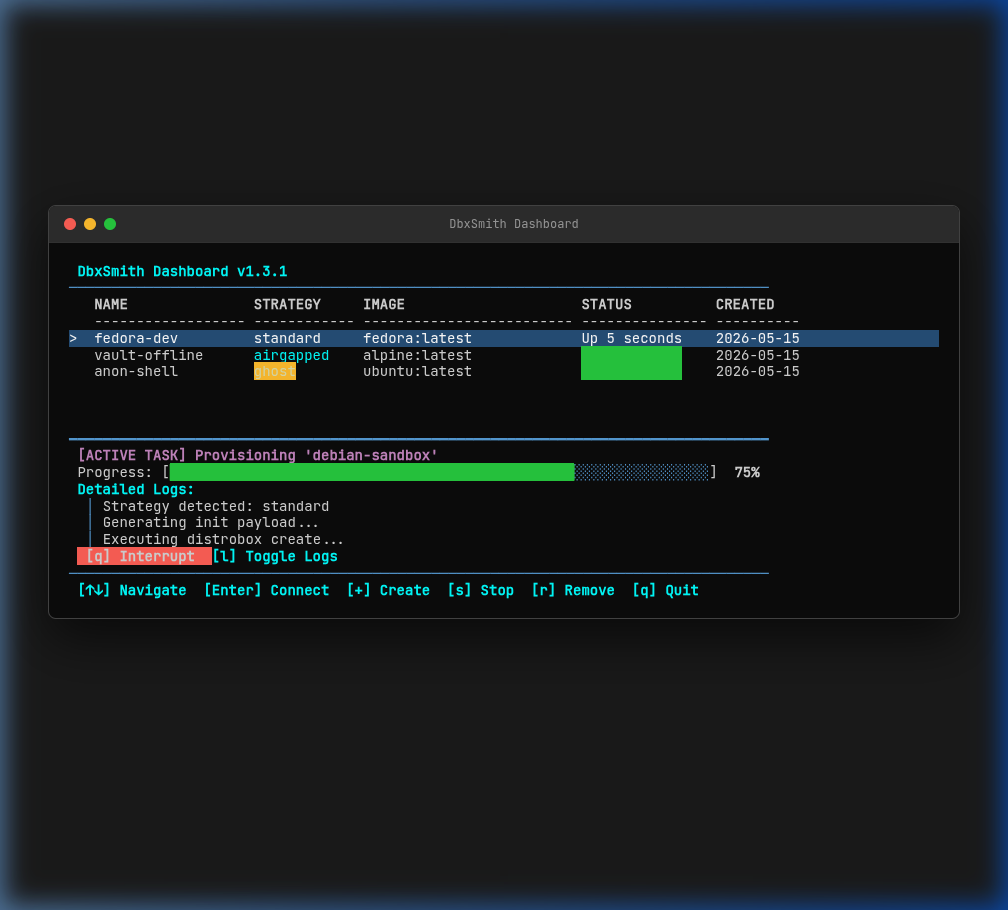
- Provision: Press
+or=to launch the smart creation wizard (choose a strategy, name, image, and optional alias). - Connect: Move the cursor with
↑/↓and pressEnterto instantly jump inside the selected sandbox. - Stop / Delete: Press
sto stop a running box, orrto delete it. - Quit: Press
qorEscto return to your host shell.
4. Provision via CLI
If you prefer standard terminal scripting, you can provision containers directly from the CLI. Let's create an Alpine container named devbox under the standard strategy, and set up a host-level shortcut alias named dev:
dbx-smith-spin standard devbox docker.io/library/alpine:latest dev
5. Enter the Sandbox (CLI or Shortcut)
You can enter your container using the standard DbxSmith runtime command:
dbx-smith devbox
Or, because we specified dev as a host-level shortcut alias during the spin step, you can connect instantly by typing your custom shortcut directly on the host:
dev
6. Atomic Purge and Teardown
When you are done with the sandbox, tear down the container along with its isolated home directories, network bridges, aliases, and registry records in a single clean sweep:
dbx-smith-rm devbox --purge
Visual Showcase
Interactive Dashboard
Manage all your containers from a single, high-performance TUI.
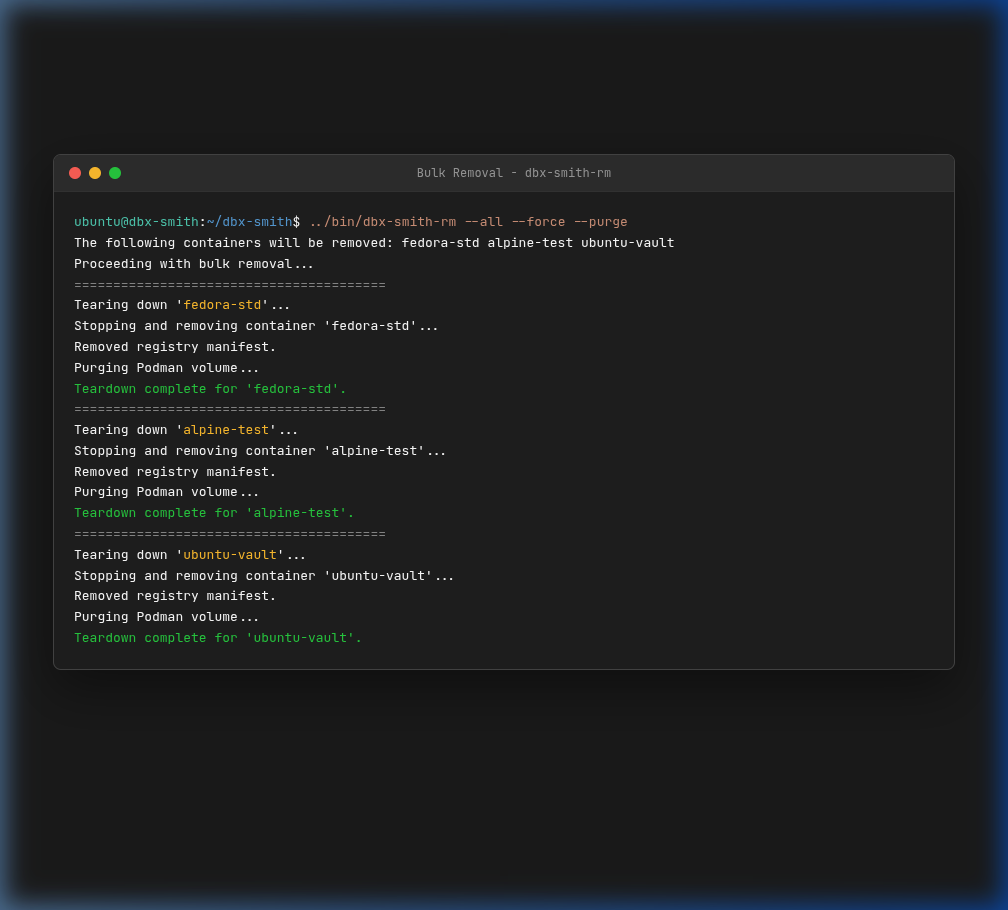
Atomic Bulk Destruction
Tear down everything—including networks and volumes—with one command.
Strategies at a glance
| Strategy | Isolation | Best for |
|---|---|---|
standard | None — shares host home + network | Daily driver, normal development |
airgapped | Full network + true tmpfs home isolation | Sensitive code, untrusted scripts, private keys |
ghost | Identity only — different user + hostname | Permission-sensitive testing, clean-slate identity |
isolated-net | True tmpfs home isolation + dedicated NAT bridge | Microservices, port-clashing services |
ghost-airgapped | Zero network + ephemeral ghost identity | Secret testing without identity leaks |
ghost-isolated-net | NAT bridge + ephemeral ghost identity | Networked testing without identity leaks |
See Strategies for full details, technical breakdowns, and example commands.
Supported Platforms
DbxSmith is built for the Linux ecosystem. It relies on low-level kernel features (namespaces, cgroups) exposed by Podman and Distrobox.
- ✅ Supported: All major Linux distributions (Fedora, Ubuntu, Debian, Arch, OpenSUSE, etc.)
- ❌ Unsupported: macOS and Windows.
- Note for Mac users: Distrobox does not run natively on macOS. While you can run DbxSmith inside a Linux VM on Mac, the host-integration features (like shared home paths) will be limited to the VM environment.
💡 PREREQUISITES
DbxSmith requires Linux, Distrobox, and Podman. If Distrobox is missing on your Linux host, the installer will detect this and offer to set it up automatically.